

Sudurpashchim Province Computer Operator Exam Quiz 2082-10-24
About This WebsiteWelcome to TheDigitalNepal.com — a free educational platform created to support students, job seekers, and competitive exam...
TheDigitalNepal
February 10, 2026
| S.N | Topic | Note Link | Mcq Link Practices |
|---|---|---|---|
|
1 |
Computer Fundamentals |
Download PDF |
|
|
2 |
Operating System |
Content |
|
|
3 |
Word Processing |
Content |
|
|
4 |
Electronic Spreadsheets |
Content |
|
|
5 |
Database Systems |
Content |
|
|
6 |
Presentation Systems |
Content |
|
|
7. |
Web Designing and Social Media |
Content |
|
|
8. |
Computer Networks |
Content |
|
|
9. |
Cyber Security |
Content |
|
|
10. |
Hardware Maintenance and Troubleshooting |
Content |
|
|
11. |
Relevant Legislations and Institutions |
Content |
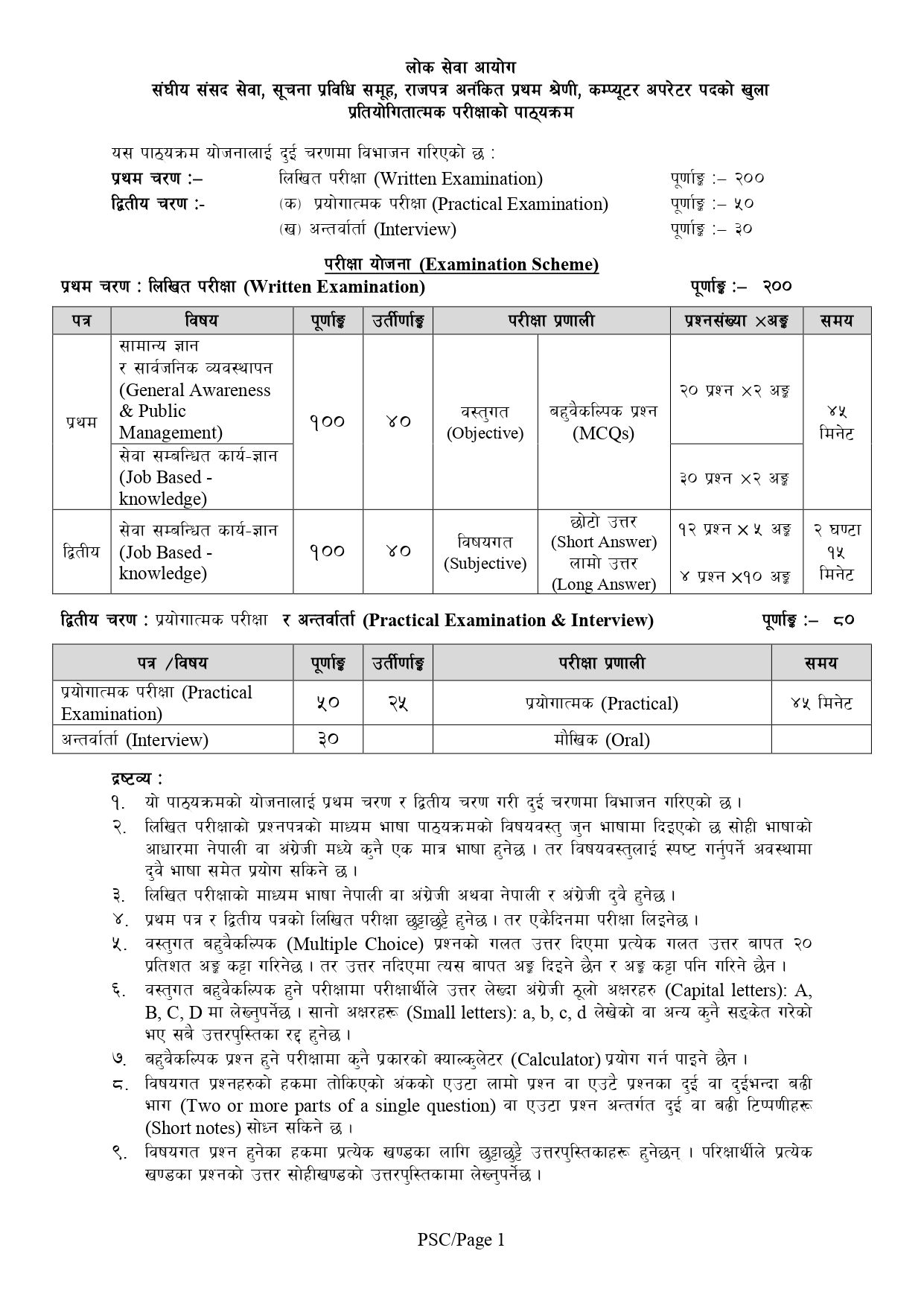
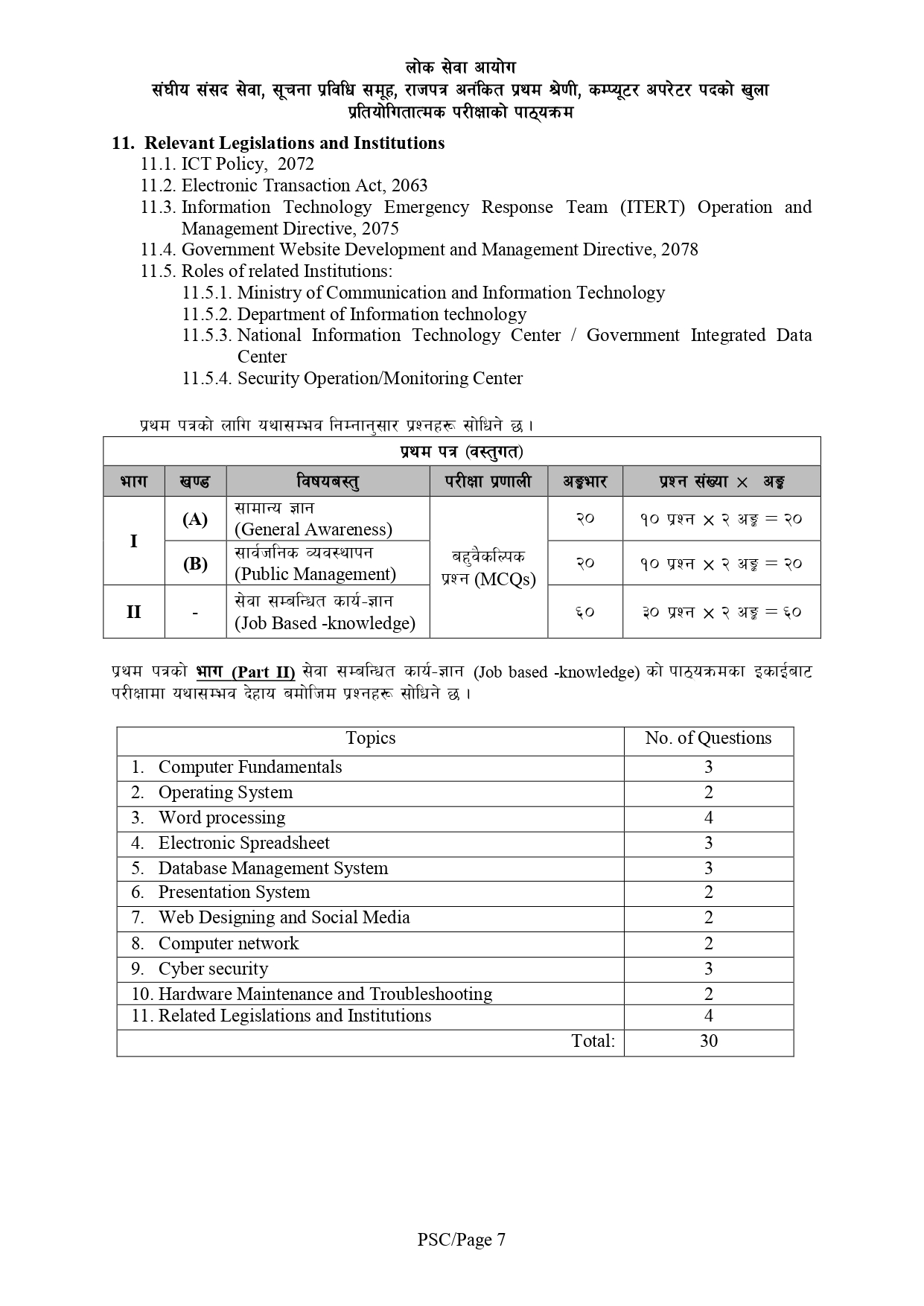
The Loksewa Aayog computer operator PDF notes are divided into 11 major sections, aligned with the official syllabus. Here’s a detailed breakdown of each section:
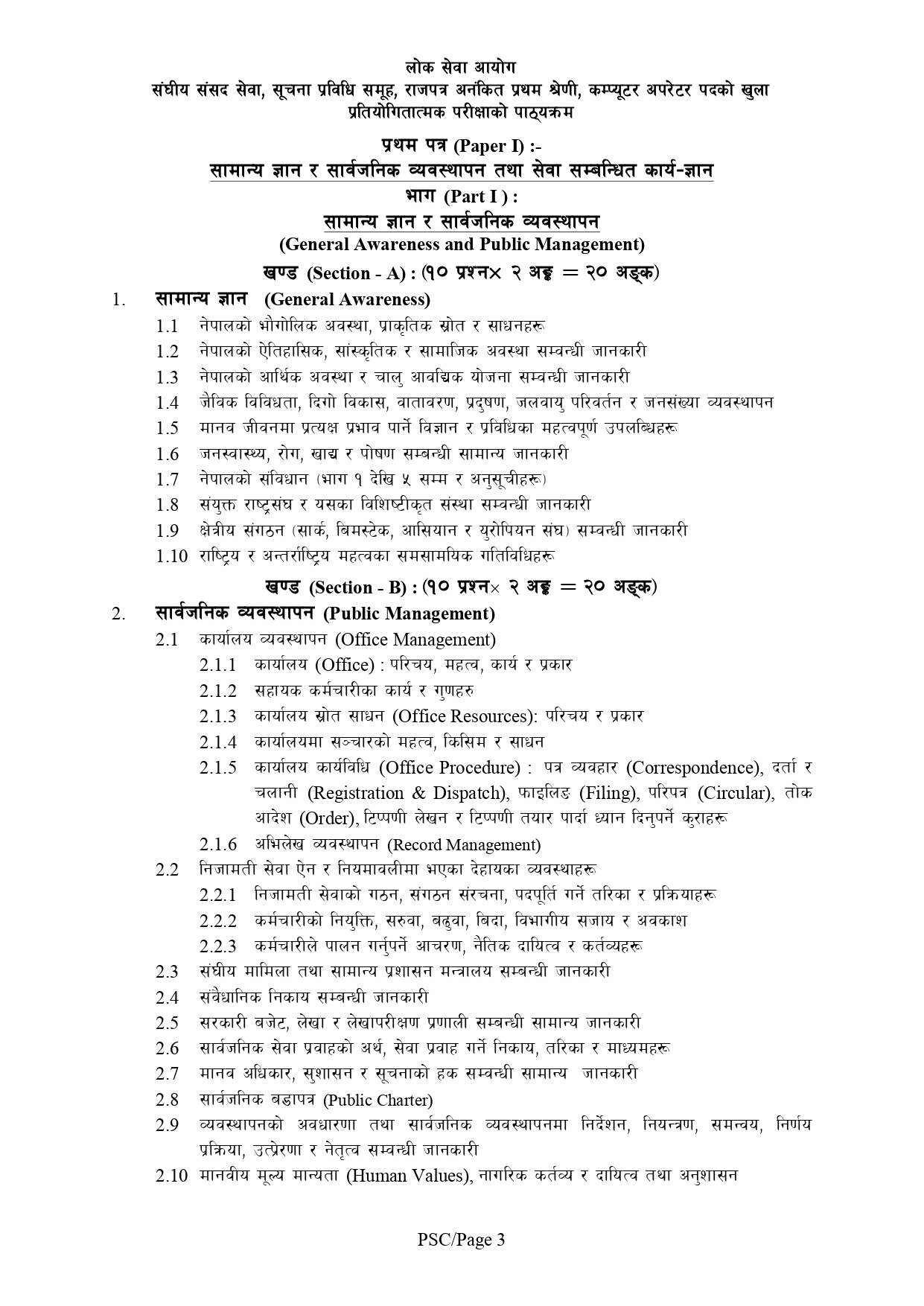
1. Computer Fundamentals
1.1. Definition, History, Generation, Characteristics, Types & Applications of Computers
1.2. Overview of a computer system
1.2.1. Data and data processing
1.2.2. Hardware: Definition; Input Unit, CPU, Output Unit; Storage devices: Primary
& Auxiliary Memory
1.2.3. Software: Definition; Types of Software; Programming Language& its types
1.2.4. Firmware and Cache Memory
1.3. Concept of Multimedia
1.4. File Management
1.4.1. Physical Structure of the disk
1.4.2. Concept of File and folder
1.4.3. Type of files and file extensions
1.5. Introduction to ASCII and Unicode standards
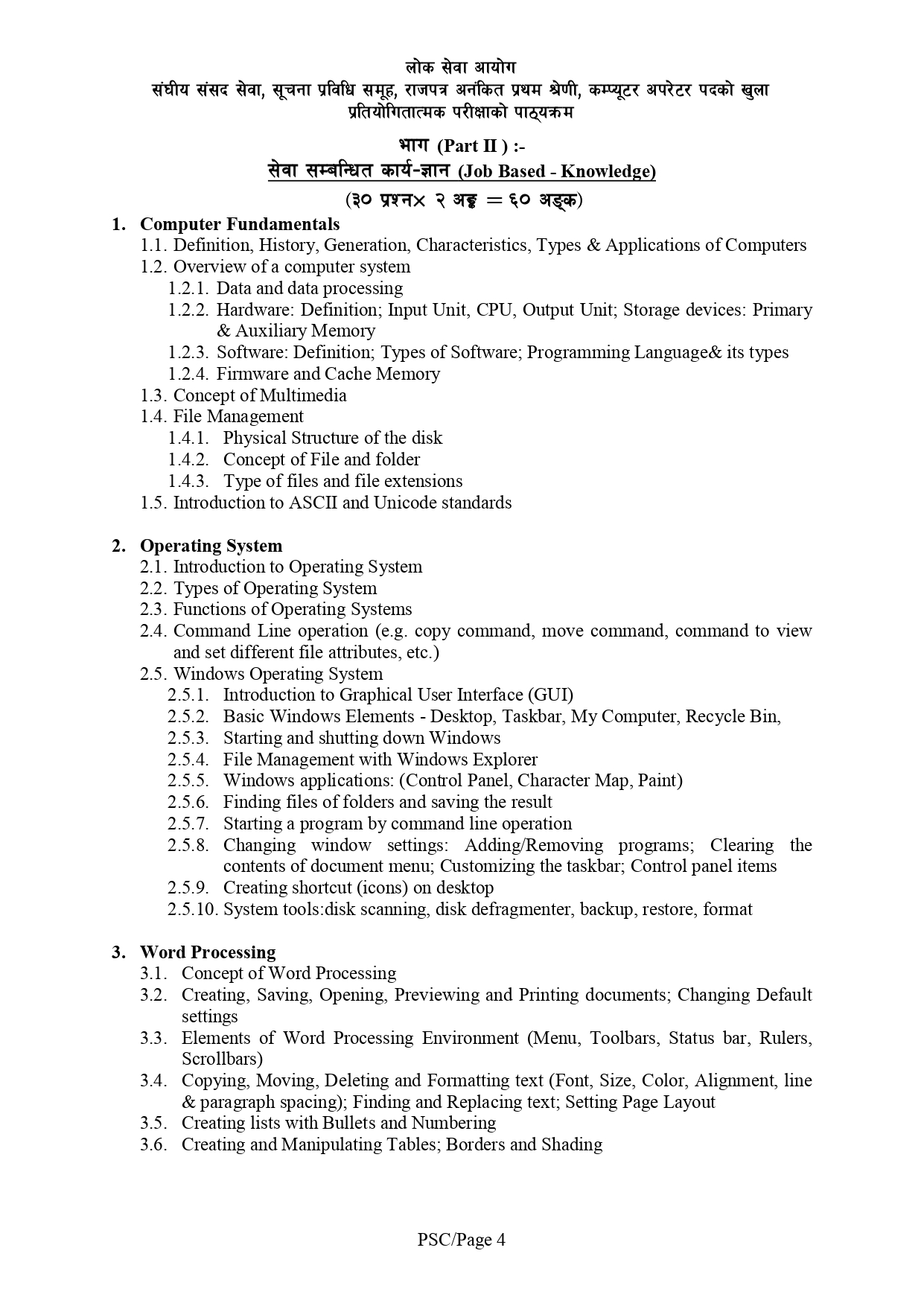
2. Operating System
2.1. Introduction to Operating System
2.2. Types of Operating System
2.3. Functions of Operating Systems
2.4. Command Line operation (e.g. copy command, move command, command to view
and set different file attributes, etc.)
2.5. Windows Operating System
2.5.1. Introduction to Graphical User Interface (GUI)
2.5.2. Basic Windows Elements – Desktop, Taskbar, My Computer, Recycle Bin,
2.5.3. Starting and shutting down Windows
2.5.4. File Management with Windows Explorer
2.5.5. Windows applications: (Control Panel, Character Map, Paint)
2.5.6. Finding files of folders and saving the result
2.5.7. Starting a program by command line operation
2.5.8. Changing window settings: Adding/Removing programs; Clearing the
contents of document menu; Customizing the taskbar; Control panel items
2.5.9. Creating shortcut (icons) on desktop
2.5.10. System tools:disk scanning, disk defragmenter, backup, restore, forma
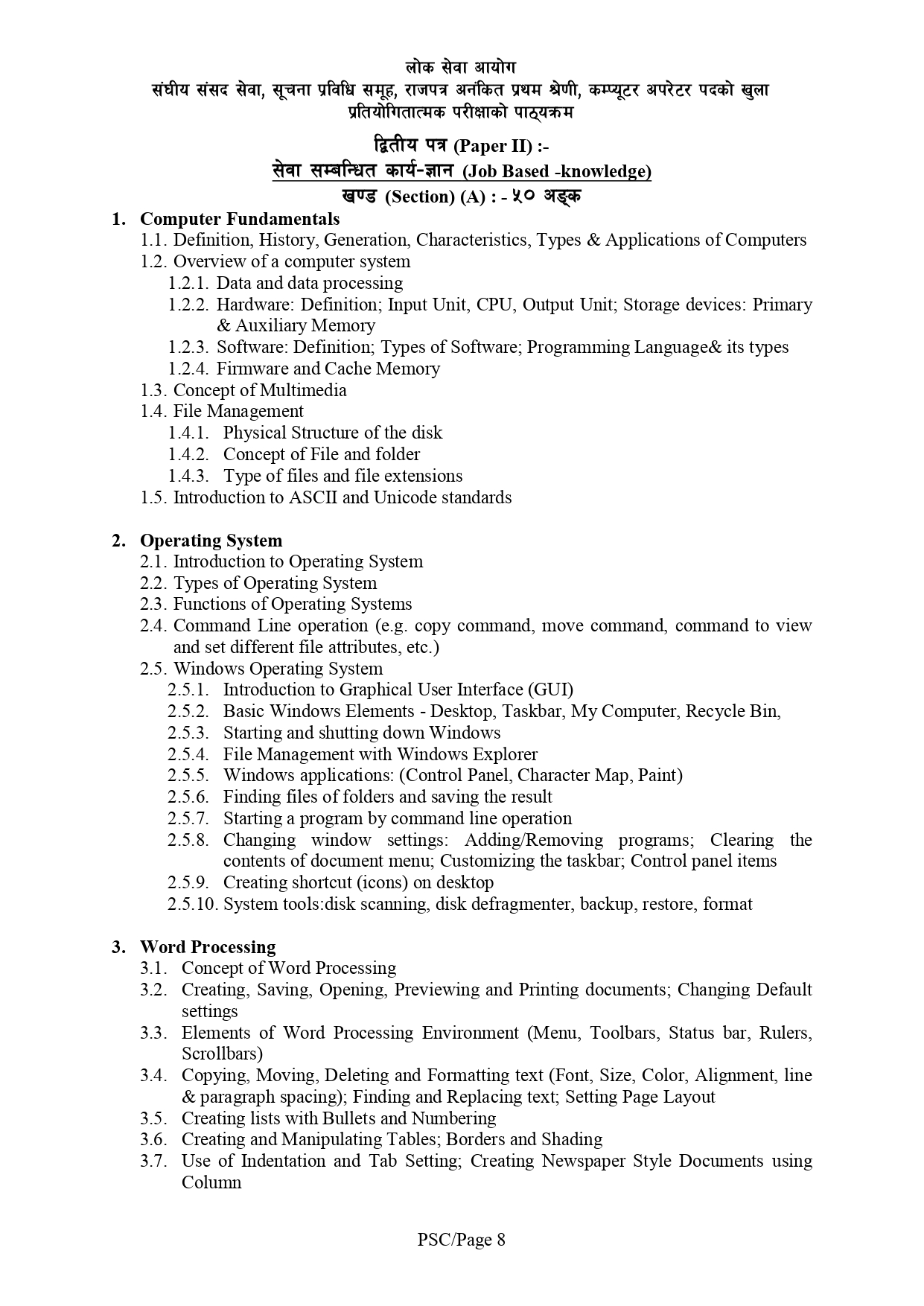
3. Word Processing
3.1. Concept of Word Processing
3.2. Creating, Saving, Opening, Previewing and Printing documents; Changing Default
settings
3.3. Elements of Word Processing Environment (Menu, Toolbars, Status bar, Rulers,
Scrollbars)
3.4. Copying, Moving, Deleting and Formatting text (Font, Size, Color, Alignment, line
& paragraph spacing); Finding and Replacing text; Setting Page Layout
3.5. Creating lists with Bullets and Numbering
3.6. Creating and Manipulating Tables; Borders and Shading
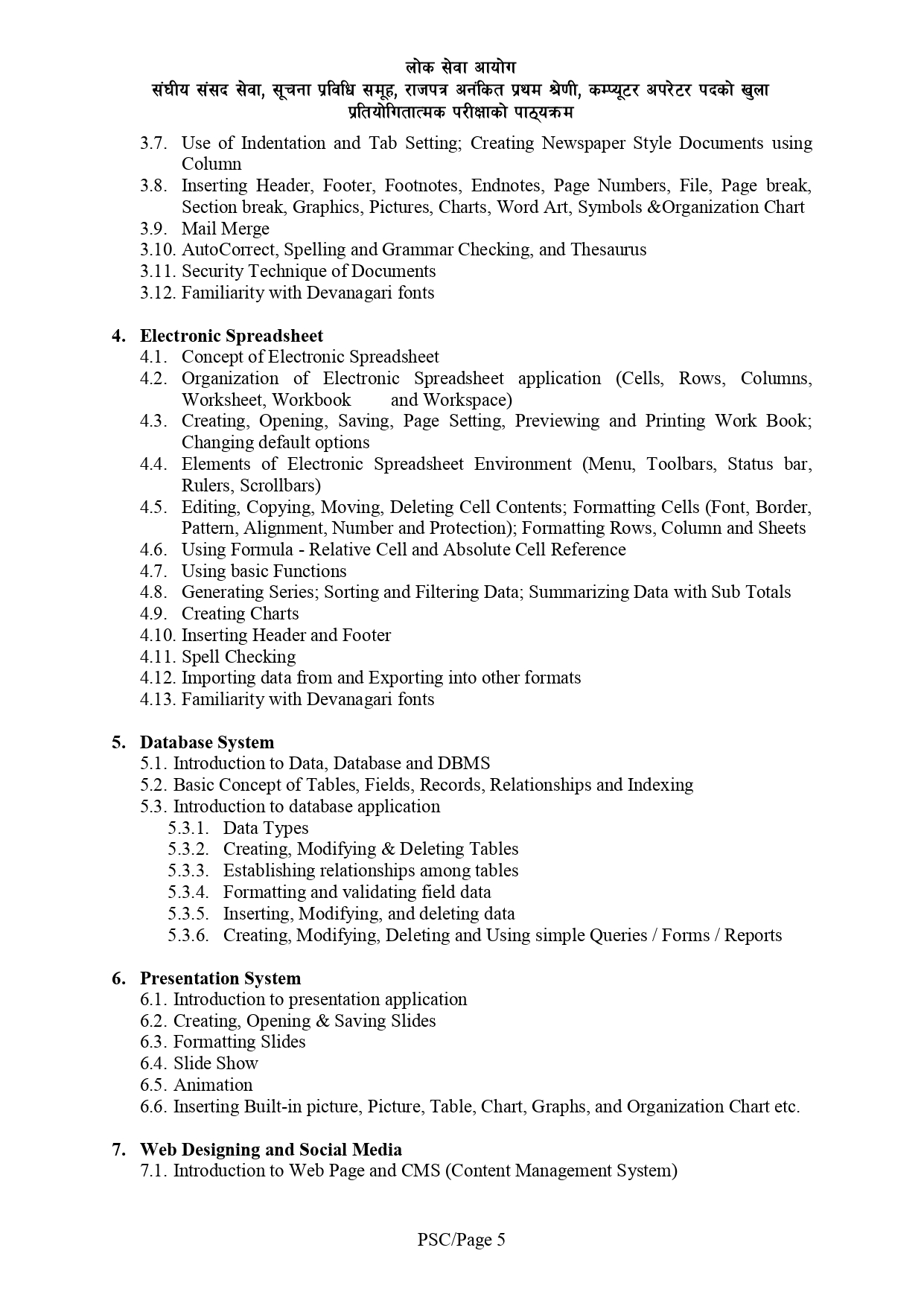
3.7. Use of Indentation and Tab Setting; Creating Newspaper Style Documents using
Column
3.8. Inserting Header, Footer, Footnotes, Endnotes, Page Numbers, File, Page break,
Section break, Graphics, Pictures, Charts, Word Art, Symbols &Organization Chart
3.9. Mail Merge
3.10. AutoCorrect, Spelling and Grammar Checking, and Thesaurus
3.11. Security Technique of Documents
3.12. Familiarity with Devanagari fonts
4. Electronic Spreadsheet
4.1. Concept of Electronic Spreadsheet
4.2. Organization of Electronic Spreadsheet application (Cells, Rows, Columns,
Worksheet, Workbook and Workspace)
4.3. Creating, Opening, Saving, Page Setting, Previewing and Printing Work Book;
Changing default options
4.4. Elements of Electronic Spreadsheet Environment (Menu, Toolbars, Status bar,
Rulers, Scrollbars)
4.5. Editing, Copying, Moving, Deleting Cell Contents; Formatting Cells (Font, Border,
Pattern, Alignment, Number and Protection); Formatting Rows, Column and Sheets
4.6. Using Formula – Relative Cell and Absolute Cell Reference
4.7. Using basic Functions
4.8. Generating Series; Sorting and Filtering Data; Summarizing Data with Sub Totals
4.9. Creating Charts
4.10. Inserting Header and Footer
4.11. Spell Checking
4.12. Importing data from and Exporting into other formats
4.13. Familiarity with Devanagari fonts
5. Database System
5.1. Introduction to Data, Database and DBMS
5.2. Basic Concept of Tables, Fields, Records, Relationships and Indexing
5.3. Introduction to database application
5.3.1. Data Types
5.3.2. Creating, Modifying & Deleting Tables
5.3.3. Establishing relationships among tables
5.3.4. Formatting and validating field data
5.3.5. Inserting, Modifying, and deleting data
5.3.6. Creating, Modifying, Deleting and Using simple Queries / Forms / Reports
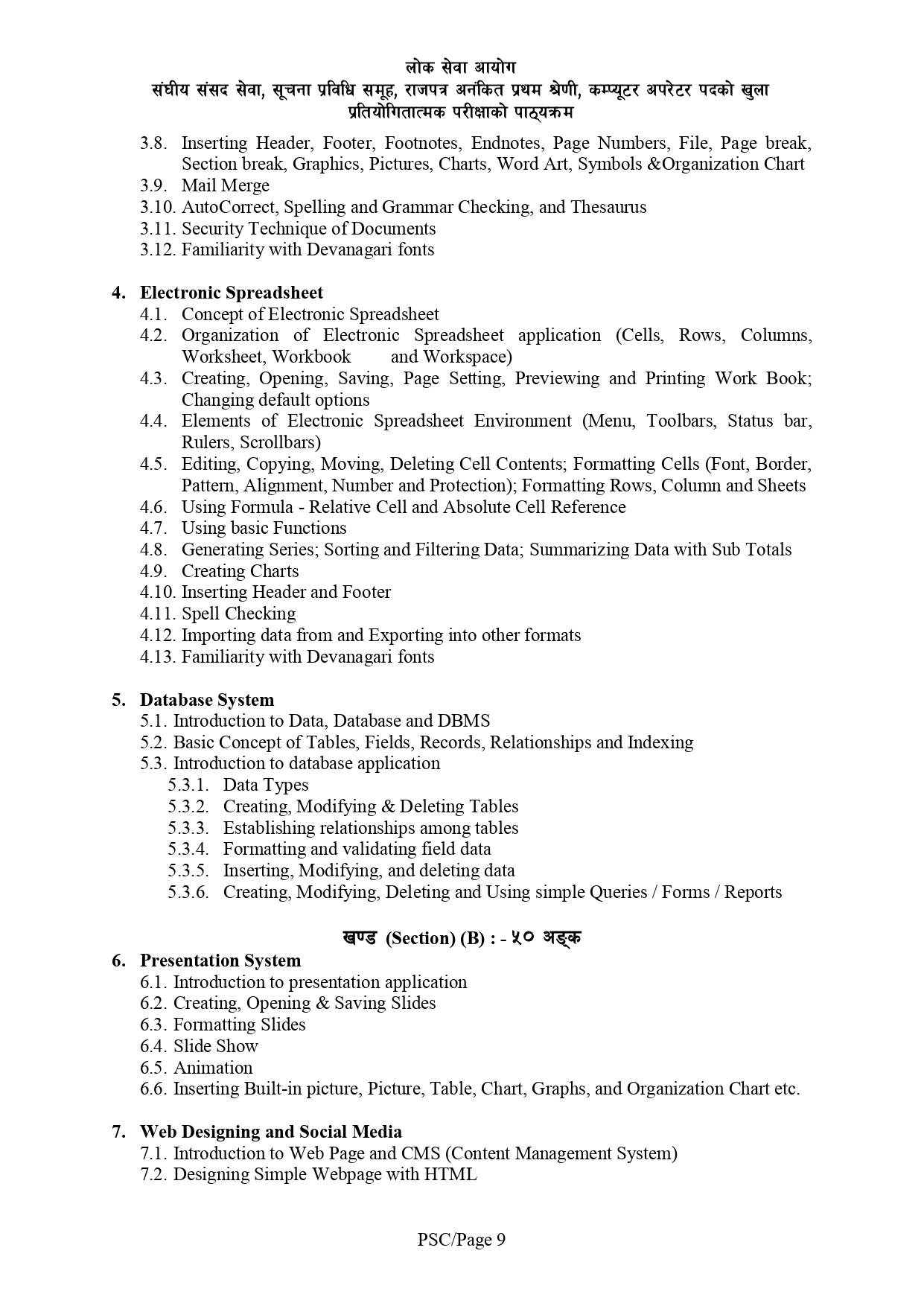
6. Presentation System
6.1. Introduction to presentation application
6.2. Creating, Opening & Saving Slides
6.3. Formatting Slides
6.4. Slide Show
6.5. Animation
6.6. Inserting Built-in picture, Picture, Table, Chart, Graphs, and Organization Chart etc.
7. Web Designing and Social Media
7.1. Introduction to Web Page and CMS (Content Management System)
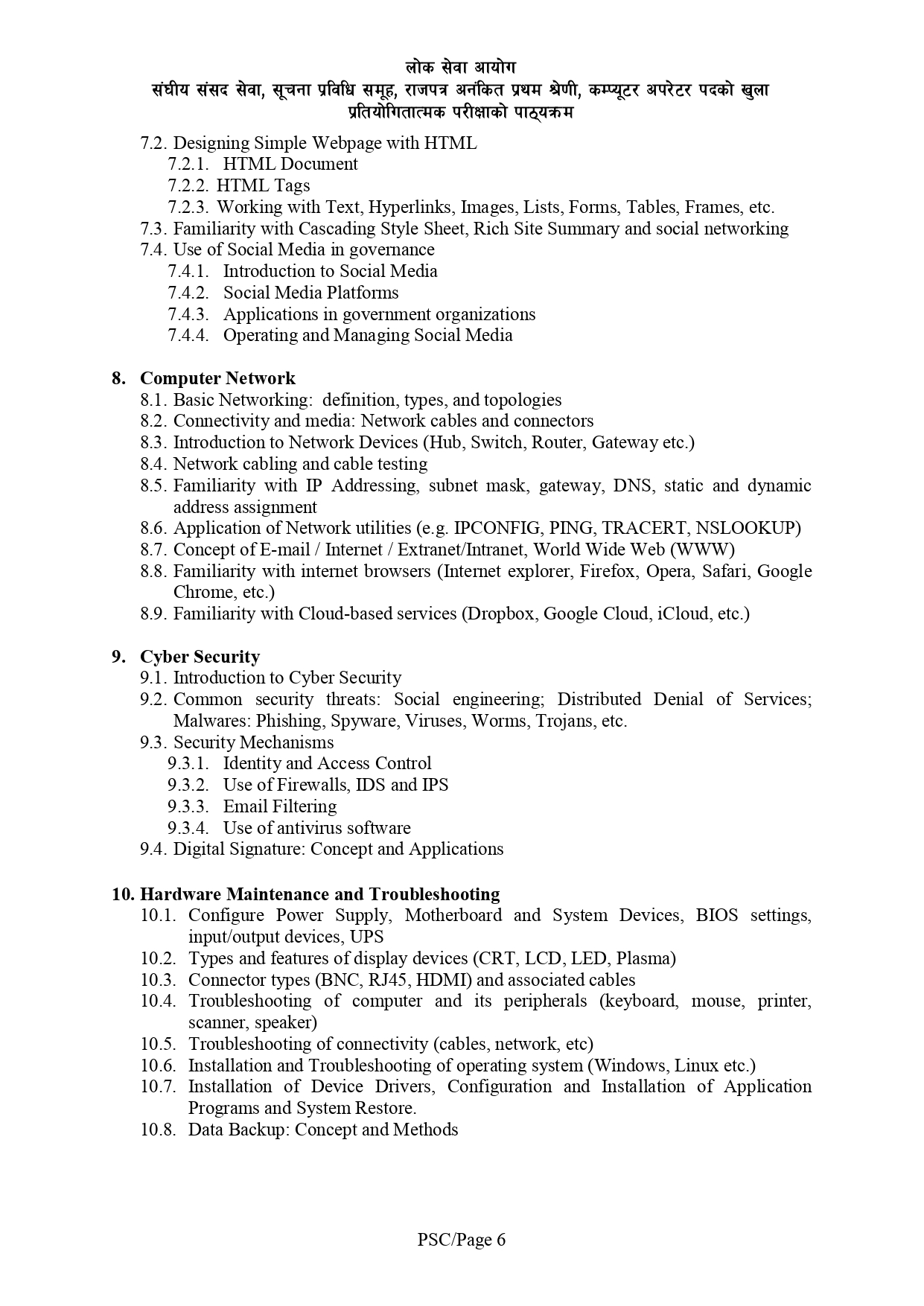
7.2. Designing Simple Webpage with HTML
7.2.1. HTML Document
7.2.2. HTML Tags
7.2.3. Working with Text, Hyperlinks, Images, Lists, Forms, Tables, Frames, etc.
7.3. Familiarity with Cascading Style Sheet, Rich Site Summary and social networking
7.4. Use of Social Media in governance
7.4.1. Introduction to Social Media
7.4.2. Social Media Platforms
7.4.3. Applications in government organizations
7.4.4. Operating and Managing Social Media
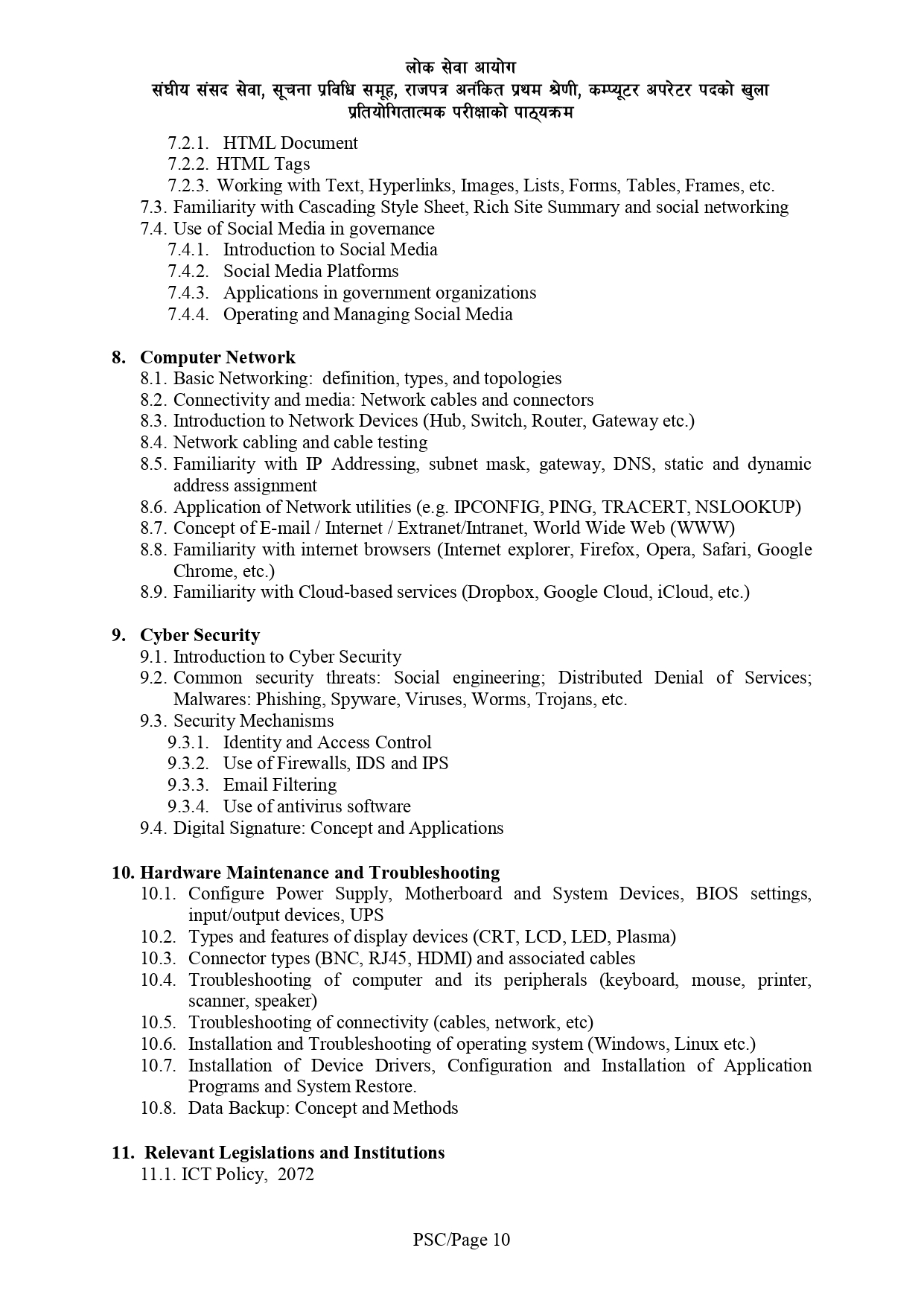
8. Computer Network
8.1. Basic Networking: definition, types, and topologies
8.2. Connectivity and media: Network cables and connectors
8.3. Introduction to Network Devices (Hub, Switch, Router, Gateway etc.)
8.4. Network cabling and cable testing
8.5. Familiarity with IP Addressing, subnet mask, gateway, DNS, static and dynamic
address assignment
8.6. Application of Network utilities (e.g. IPCONFIG, PING, TRACERT, NSLOOKUP)
8.7. Concept of E-mail / Internet / Extranet/Intranet, World Wide Web (WWW)
8.8. Familiarity with internet browsers (Internet explorer, Firefox, Opera, Safari, Google
Chrome, etc.)
8.9. Familiarity with Cloud-based services (Dropbox, Google Cloud, iCloud, etc.)
9. Cyber Security
9.1. Introduction to Cyber Security
9.2. Common security threats: Social engineering; Distributed Denial of Services;
Malwares: Phishing, Spyware, Viruses, Worms, Trojans, etc.
9.3. Security Mechanisms
9.3.1. Identity and Access Control
9.3.2. Use of Firewalls, IDS and IPS
9.3.3. Email Filtering
9.3.4. Use of antivirus software
9.4. Digital Signature: Concept and Applications
10. Hardware Maintenance and Troubleshooting
10.1. Configure Power Supply, Motherboard and System Devices, BIOS settings,
input/output devices, UPS
10.2. Types and features of display devices (CRT, LCD, LED, Plasma)
10.3. Connector types (BNC, RJ45, HDMI) and associated cables
10.4. Troubleshooting of computer and its peripherals (keyboard, mouse, printer,
scanner, speaker)
10.5. Troubleshooting of connectivity (cables, network, etc)
10.6. Installation and Troubleshooting of operating system (Windows, Linux etc.)
10.7. Installation of Device Drivers, Configuration and Installation of Application
Programs and System Restore.
10.8. Data Backup: Concept and Methods
11. Relevant Legislations and Institutions
11.1. ICT Policy, 2072
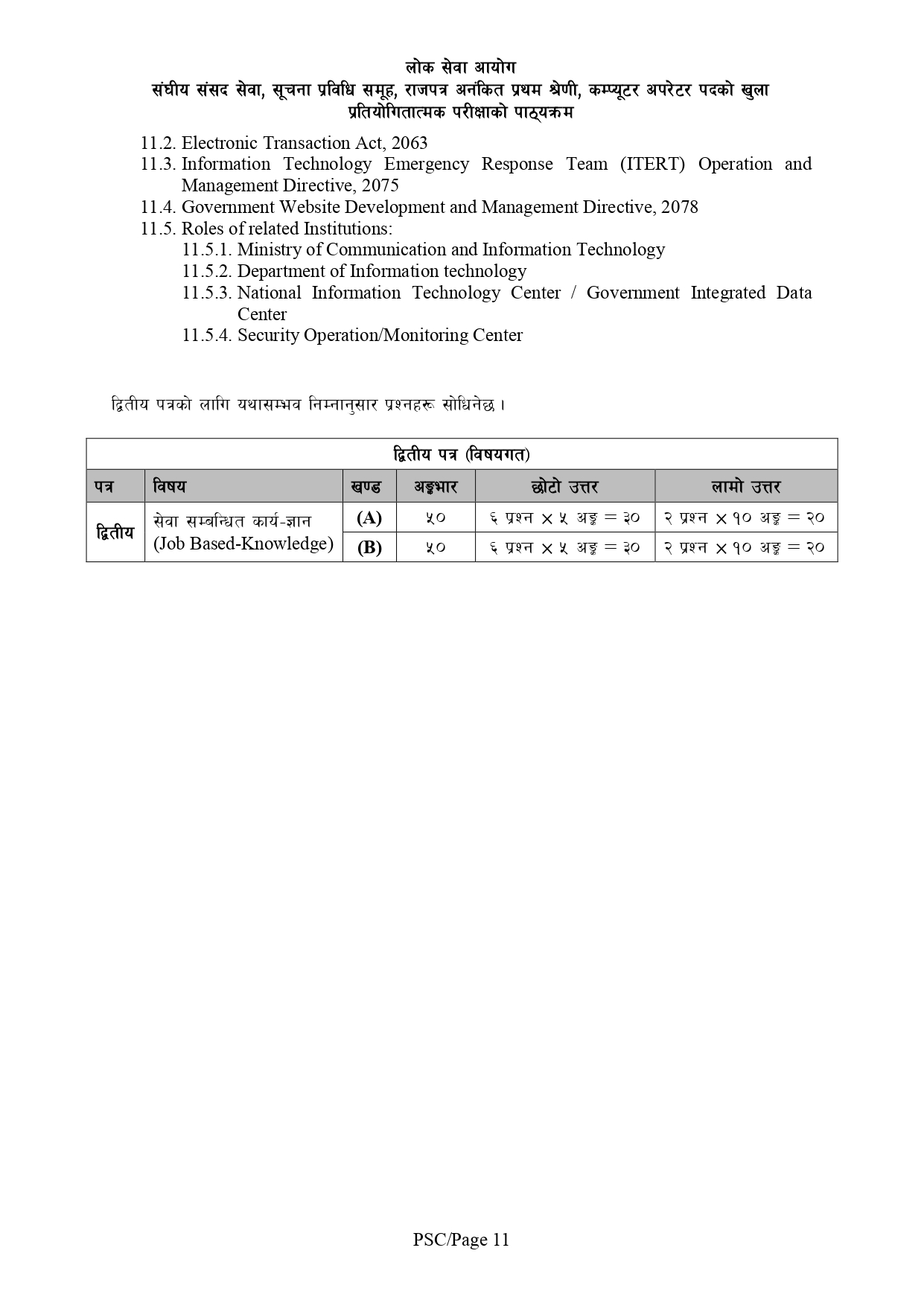
11.2. Electronic Transaction Act, 2063
11.3. Information Technology Emergency Response Team (ITERT) Operation and
Management Directive, 2075
11.4. Government Website Development and Management Directive, 2078
11.5. Roles of related Institutions:
11.5.1. Ministry of Communication and Information Technology
11.5.2. Department of Information technology
11.5.3. National Information Technology Center / Government Integrated Data
Center
11.5.4. Security Operation/Monitoring Center
Yes, all notes are available for free on our website.
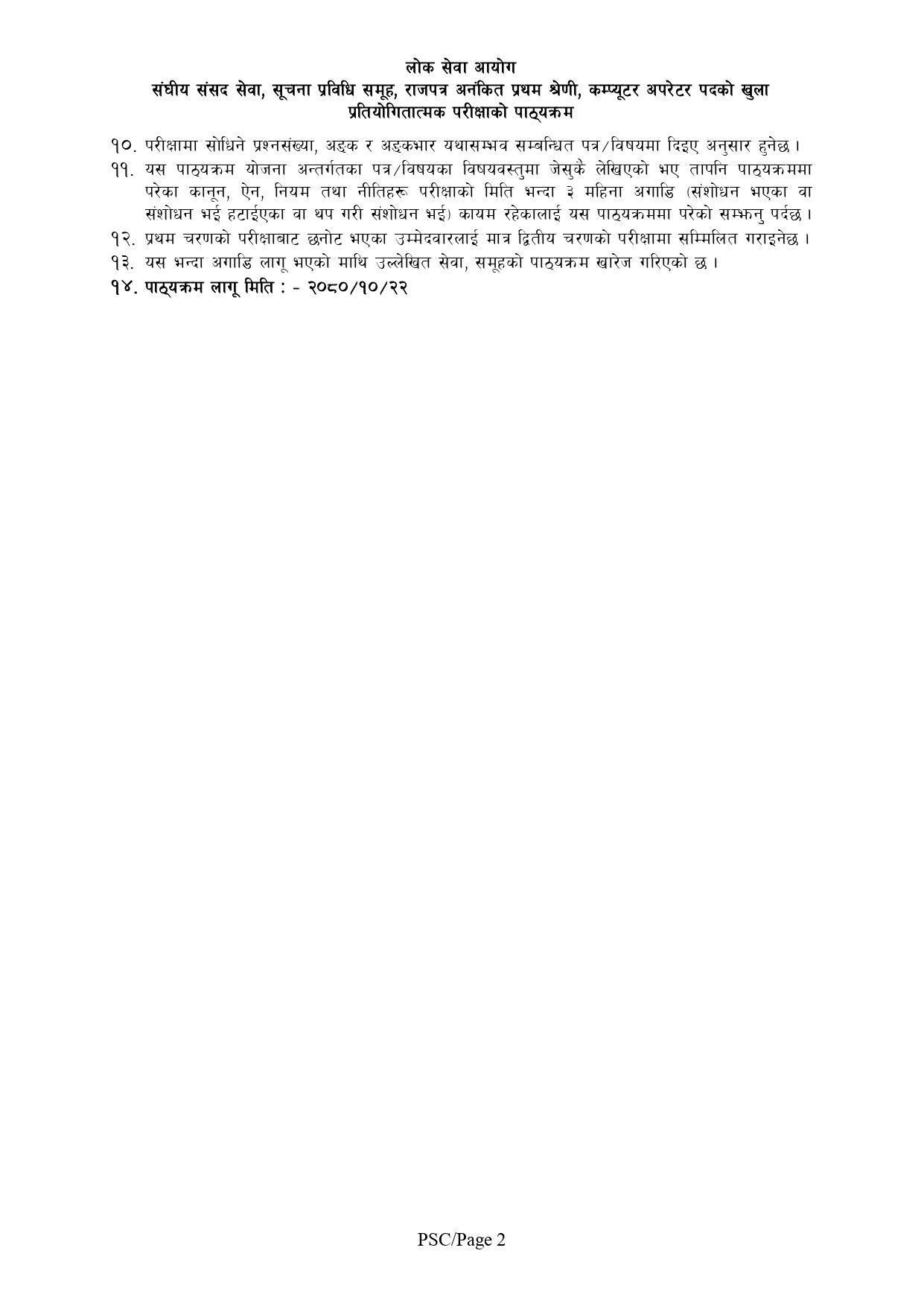
The notes are divided into 11 parts, covering the complete syllabus.
Absolutely! The notes are in PDF format, compatible with all devices.
Yes, practical examples and illustrations are included for better understanding.
Our website regularly updates the syllabus and notes to align with Loksewa Aayog guidelines.
About This WebsiteWelcome to TheDigitalNepal.com — a free educational platform created to support students, job seekers, and competitive exam...
Computer Operator Syllabus: The Public Service Commission (Lok Sewa Aayog) conducts open and competitive examinations to recruit candidates for...

If you’re looking for web hosting in Nepal that’s fast, secure, and supported by a local team, Himalayan Host...